AI-Powered ITSM & Device Management
Unifying ITSM and Endpoint Management with a Single AI-Powered Agent.
Hard Disk
What is Hard Disk Monitoring?
Hard disk monitoring is the process of tracking and analyzing the storage usage, performance, and health of a computer’s hard drive. IT teams and system administrators use hard disk monitoring tools to ensure that storage devices are operating efficiently, securely, and without risks of failure.
Information Available in this Section
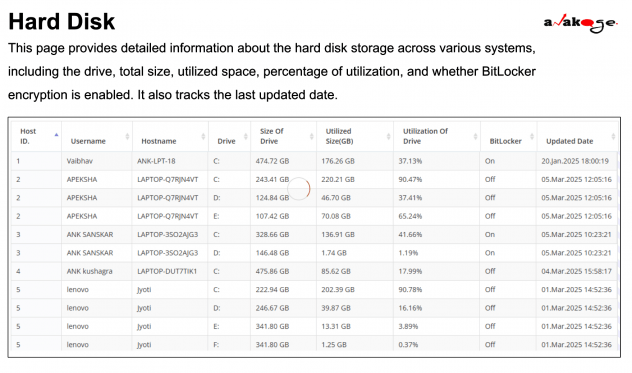
The Hard Disk Details section provides a comprehensive view of hard disk usage across different monitored devices. The following data is captured:
| Field Name | Description |
|---|---|
| Host ID | A unique identifier assigned to each system for tracking purposes. |
| Username | The user associated with the system, helping identify individual usage patterns. |
| Hostname | The name of the computer or device where the hard disk is installed. |
| Drive | The specific disk drive being monitored (e.g., C:, D:, E:). |
| Size of Drive | The total storage capacity of the disk drive. |
| Utilized Size (GB) | The amount of storage space currently used in gigabytes. |
| Utilization of Drive | The percentage of the drive’s storage that has been consumed. |
| BitLocker | Indicates whether BitLocker encryption is enabled for data protection. |
| Updated Date | The timestamp of the last update to reflect the latest storage status. |
Search Field Functionality
The search feature allows IT teams to quickly locate hard disk details based on a hostname or username.
How to Use the Search Field:
1.Enter a hostname or username in the search field to find specific hard disk details.
2.View the displayed information, which includes:
- Storage usage
- Encryption status
- Last update timestamp
3.Clear Search by clicking the Clear button to reset the search field.
4.Repeat the search by entering another hostname or username to fetch details for a different system.
Why is Hard Disk Monitoring Importan
- Prevent Data Loss: Hard drives can fail unexpectedly. Monitoring helps identify potential issues before they lead to data loss.
- Optimize Performance: By analyzing storage usage and performance metrics, you can ensure that your hard drive is running at its best, which can speed up your computer.
- Plan for Upgrades: Monitoring tools can help you understand when it’s time to upgrade your storage, ensuring you have enough space for your needs.